
Lumen Grid: Competitive Multi-Robot Parking Game
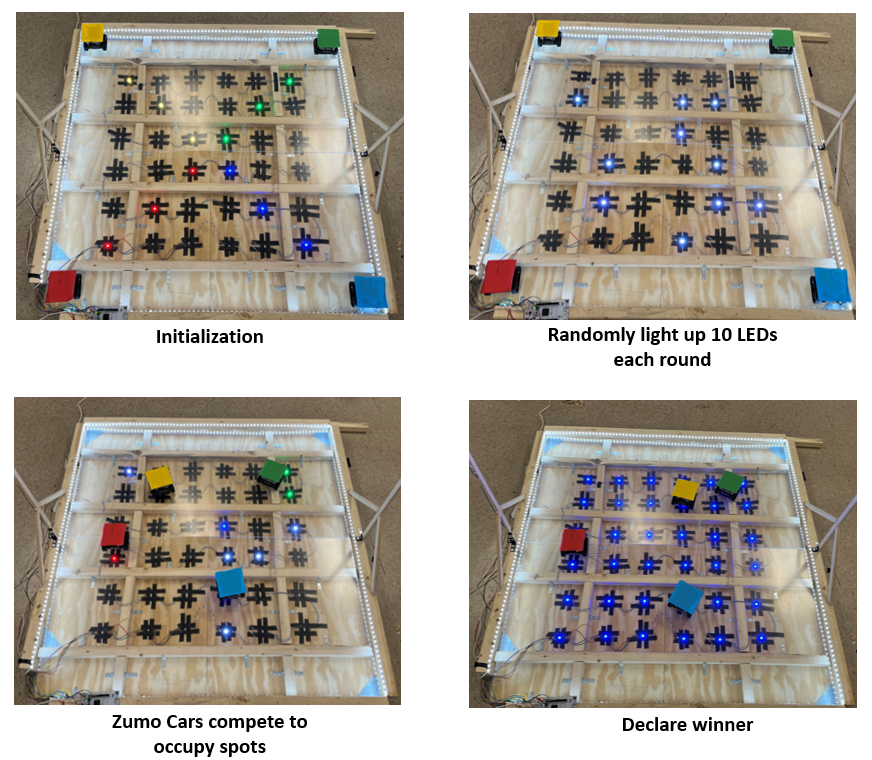
This is the final project for EECS 373 Introduction to Embedded System Design at UM. This course is mainly teaching embedded system in general and place a focus on using the STM32 microcontroller in the lab. For the final project, we are allowed to choose whatever we want to build as long as it demonstrate our skills in embedded system design. To make things fun, our project is about designing a physical game where each user controls a toy vehicle (Zumo) and competes for occuping as many parking spots as possible. Specifically, the game has the following rules:
- Players: 4 Zumo cars (each with a unique color).
- Rounds: 3 trials for each round; highest total score wins.
- Parking Spots: 10 spots per round (randomly generated, indicated by white LEDs).
- Time Limit: 60 seconds per round.
- Scoring: A robot scores only if it succuessfully occupies an available spot and turns that spot into its own color.
System Architecture
The parking game is an integration of three different subsystems: Bluetooth-based remote controller, Zumo Car, and Playground. When playing the game, each user have a remote controller that controls one zumo car. All four zumo cars run on the playgound where there are 36 pre-defined “parking lots”. A camera on top of the playground detects each cars position and change the LED corresponds to a specific parking lot if the car hit that spot. For more detail, please refer to the source code. 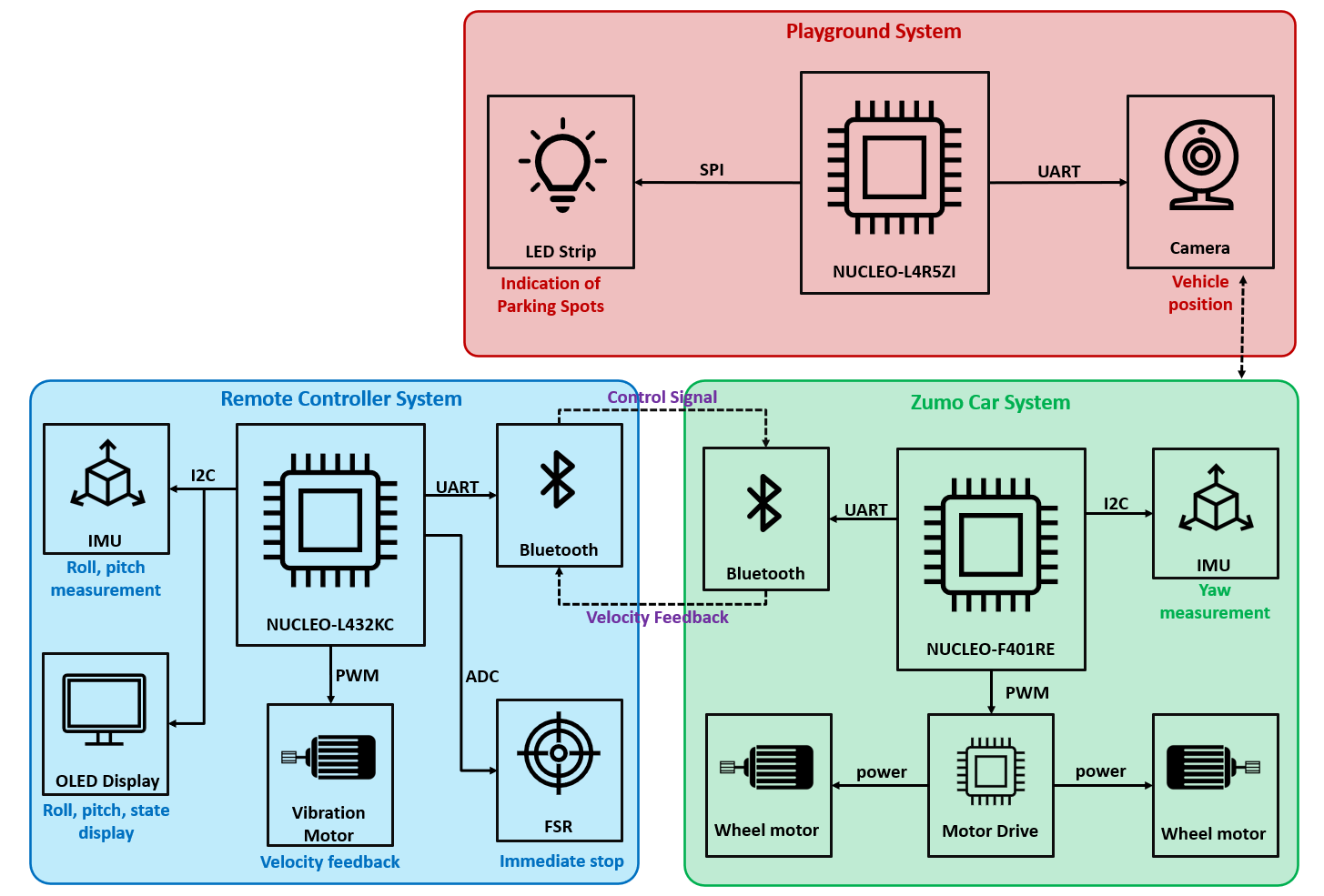
Remote Controller System (NUCLEO L432KC)
The handheld controller reads your gestures from an IMU and turns pitch/roll into throttle and steering commands, with a force-sensitive resistor acting as an instant emergency stop. It sends those commands over Bluetooth (HC-05) to the robot, while a tiny vibration motor mirrors speed of the car for haptic “feel,” besides, an OLED can show status including pitch, roll and the cars speed.
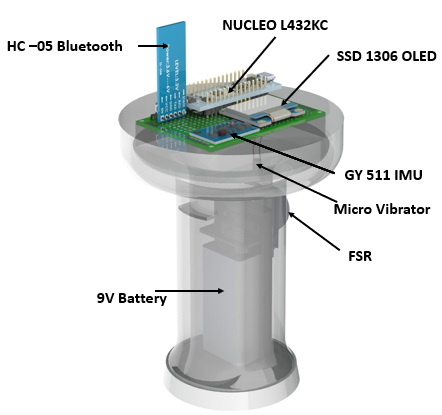
We made some innovative thoughts on reinventing the controllers for RC cars. The goal is simple: make driving feel natural. There are no complex joystick on the controller. All of the control commands were derived from an IMU. The controller circuit was built into a small handle that can be carried by on hand. This make driving the car extremely simple: you just need to steer your hand, and the steering commands are automatically mapped onto the car. An vibration motor was integrated into the handle, which provide intuitive haptics feedback of the motor’s speed.
Zumo Car System (NUCLEO F401RE)
On each Zumo, the onboard IMU measures yaw so a PID loop can keep motion smooth and straight, while a motor driver handles PWM to the tracks for precise turns and acceleration. The car listens for Bluetooth commands from its paired remote controller, executes them, and reports velocity back so the driver gets real-time feedback. It’s a tight little control loop designed for quick reactions on a crowded field.
Playground System (NUCLEO L4R5ZI)
The field controller runs the game: it generates ten random parking spots each round, lights them on the LED grid (essentially APA102 LED strip, can be controlled through SPI), and uses a camera to track each robot’s location by its color tag (PixyCam’s built-in color detection function). As robots claim spaces, the LEDs switch from white to the robot’s color, and the system updates scores by checking positions against assignments in real time.
If you are interested, the following video might give you a better understanding of what we were doing.
An STM32 Library for PixyCam
The PixyCam is a powerful camera module with an ESP32 processor on board that have many built in functionalities. When we choose to use it, we didn’t realized that there isn’t an existing API library for STM32. The only thing they got was an Arduino library. In this project, we have port that library to STM32. If you are interested in using PixyCam with STM32, have a look at our github repository. (Note: Although PixyCam module supports multiple communication protocols including I2C, SPI, and UART, we have only ported the UART part of the original library).
Some Thoughts
Starting from this project, my major field of study started to change from mechanical-oriented to electrical- and computer-oriented. One fun thing about implementing this project is how we gradually increase the difficulty by adding more and more things. Actually, we added the entire playground system only three weeks before the deadline, because we completed the other two earlier than we expected (Yeah only those two were on the initial proposal).
Also, when porting the Pixycam library for STM32, I got a chance to look at the “Arduino code” from the bare-metal side and that was eye-opening. It’s not just “read sensor, drive motors.” You start caring about serial framing and checksums, SPI vs UART trade-offs, DMA vs polling, interrupt timing, circular buffers, and what happens when your packets are off by exactly one byte.
Group Members: Guanyu Xu, Haobo Fang, Varun Agrawal, Xiang Jiang